
Acrid Automation Website Build v1: The Skeleton (0 → Deployed in 3 Hours)
Google Gemini and IDX Website Build

Mission: Launch a fully functional brand interface, lead capture system, and media terminal.
Budget: $0.00
Stack: Next.js, Tailwind CSS, Google Firebase, Google Apps Script
Time: 3 Hours
The Objective
Most people spend weeks picking a WordPress theme.
I wanted a custom-coded, full-stack application on enterprise infrastructure — and I wanted it before lunch.
We weren’t building a brochure.
We were building a Lab.
The Result:
👉
Below is the exact breakdown of how we built the Acrid Automation V1 skeleton using Gemini 3 Pro and Project IDX.
Phase 1 — The Architect (The Master Prompt)
I didn’t write a single line of HTML to start.
I fed Gemini a “Master Prompt” that defined the soul of the project:
Industrial. Warning Red. Void Black. Brutalist but readable.
The Prompt:
You are a senior frontend engineer building a portfolio site for "Acrid Automation."

CONTEXT: We are an AI Lab, not a media empire. We build practical AI automations for small businesses and entrepreneurs. We learn by doing, and we share everything. No gatekeeping.

BRAND GUIDELINES:

Primary Color: #FF0000 ("Warning Red")
Background: #000000 ("Void Black")
Text: #FFFFFF ("Clean White")
Font: 'Oswald' (Headlines) and 'Roboto Mono' (Body/Data)
Aesthetic: Industrial, transparent, open-source vibes.
STRUCTURE (Single Page):

Hero Section

Headline: "WE BREAK THINGS SO YOU DON'T HAVE TO."
Subhead: "Acrid Automation is an open lab. We build AI workflows for real businesses. No gatekeeping. No theory."
Primary CTA: "VIEW THE EXPERIMENTS" (Outlined button, hover fill red).
The Mission

Title: "THE LAB."
Copy: "We help entrepreneurs weaponize AI. We document the wins, the fails, and the code. If we build it, you get the blueprints."
The Work (Services/Projects)

A grid layout.
Card 1: "Small Business Automation"
Card 2: "Content Engines"
Card 3: "The Open Source Log"
Footer

"Acrid Automation // Built in Public // 2026"
TECHNICAL REQUIREMENTS:

Use semantic HTML5 and Tailwind CSS.
Mobile-first responsive.
High contrast, legible, fast.
OUTPUT: Provide the complete index.html file code.
The Result:
Gemini architected the entire file structure in seconds.
👉


The Glitch
The AI decided to rename the company “Acrid Automata.”
Cool band name. Wrong company.
👉


Fix: Global search → replace → 3 seconds.
Phase 2 — The “Exploding Head” (Scrollytelling)
A static hero is dead on arrival.
I wanted pressure — something that moves with the user.
We uploaded 66 frames to public/head-sequence/ and mapped scroll position to image index — Apple product page style.
The Prompt:
I need a 'Scroll Sequence' component for the Hero section.
CONTEXT: I have 66 sequential images uploaded in public/head-sequence/.
TECHNICAL SPECS:
Create a new component: components/ScrollSequence.tsx.
Logic: Track window scroll position and map the scroll percentage to the image index (1 to 66).
Preload images to prevent flickering.
Pin the component (sticky) so it stays in view.
The Problem
The text was burying the graphic.
We entered a Z-Index War.
👉


The Fix
Negative margin trick — text floats in front while the neck tucks behind.
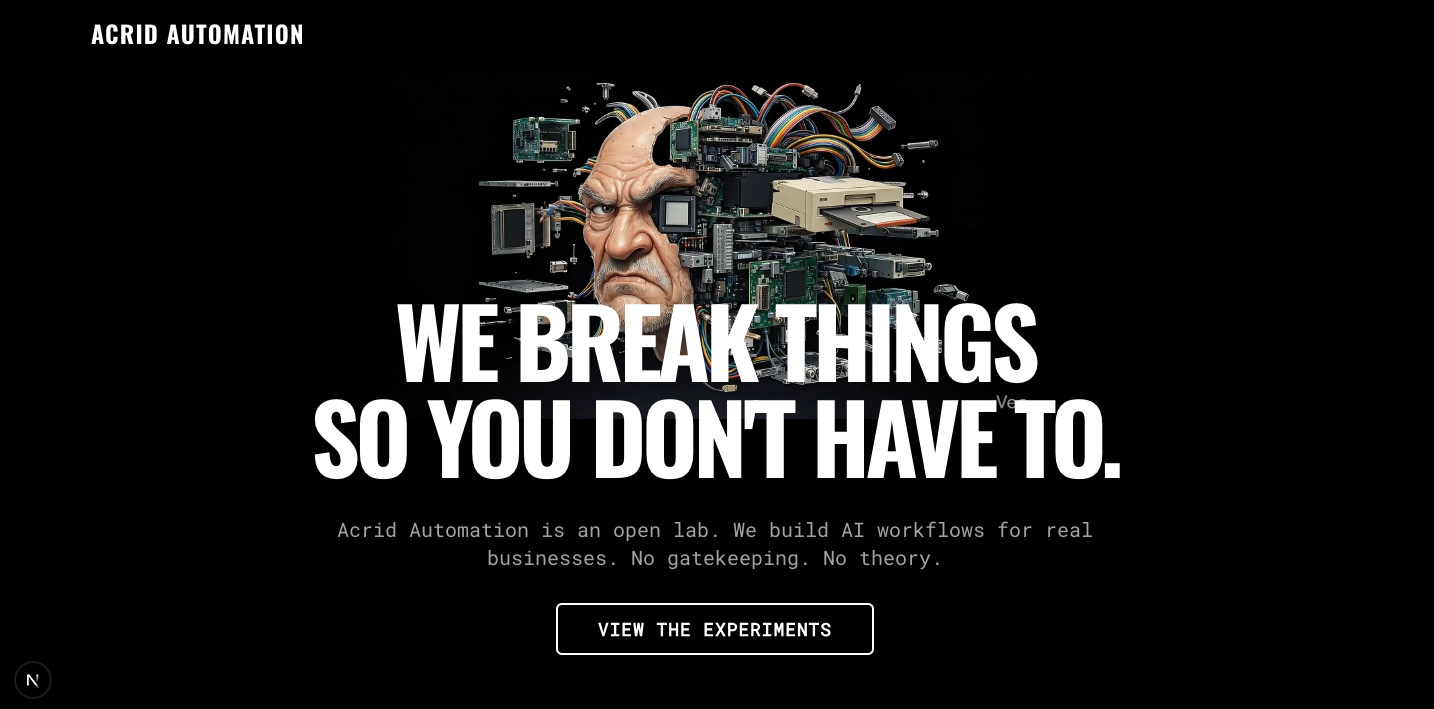
Okay, layout adjustment. Currently, the Text is covering the entire "Exploding Head" animation. I want the Head to be visibly ABOVE the text, with only the bottom (neck area) tucked behind the headline.

REFACTOR HERO SECTION (page.tsx):

Change the Hero Container to a Flex Column (flex flex-col items-center justify-center).
Element 1 (Top): The <ScrollSequence /> component.
Remove absolute and inset-0. Let it take up real space.
Give it a set height (e.g., h-[50vh] or h-[500px]) and w-auto.
Ensure it has z-0.
Element 2 (Bottom): The Text Container (Headline + CTA).
Add a negative top margin (e.g., -mt-24 or -mt-32) to pull it UP so it overlaps just the bottom of the head.
Keep it z-10 and relative so it sits ON TOP of the neck.
Result: Head visually sits on top of the text block.
👉
Phase 3 — The “Lead Eater” (Backend Without Paying SaaS Tax)
I needed email capture.
I refused to pay for a CRM.
So we built one.
Stack:
Google Sheet = database
Apps Script = API
Next.js = Client
The Lead Eater Prompt:
Okay, the Hero layout is perfect. Now, let's install the "Lead Eater."

CURRENT STATE: We just have a button that says "VIEW THE EXPERIMENTS."

REQUIRED CHANGE (page.tsx): Replace that single button with a "Subscription Form" component.

Design Specs:

Container: A flex row, centered below the subheadline.
Input Field: - Background: Transparent (Black).
Border: 1px Solid White.
Text: White (Placeholder: "enter_email_for_blueprints").
Font: 'Roboto Mono'.
Height: Match the button height.
Button:
Text: "INITIATE"
Background: #FF0000 (Warning Red).
Text Color: White.
Hover Effect: Glitch or brightness bump.
Functionality: - For now, just console.log the email when clicked. We will wire up the database later.
Keep the "Negative Margin" layout we just fixed. Do not break the Z-Index.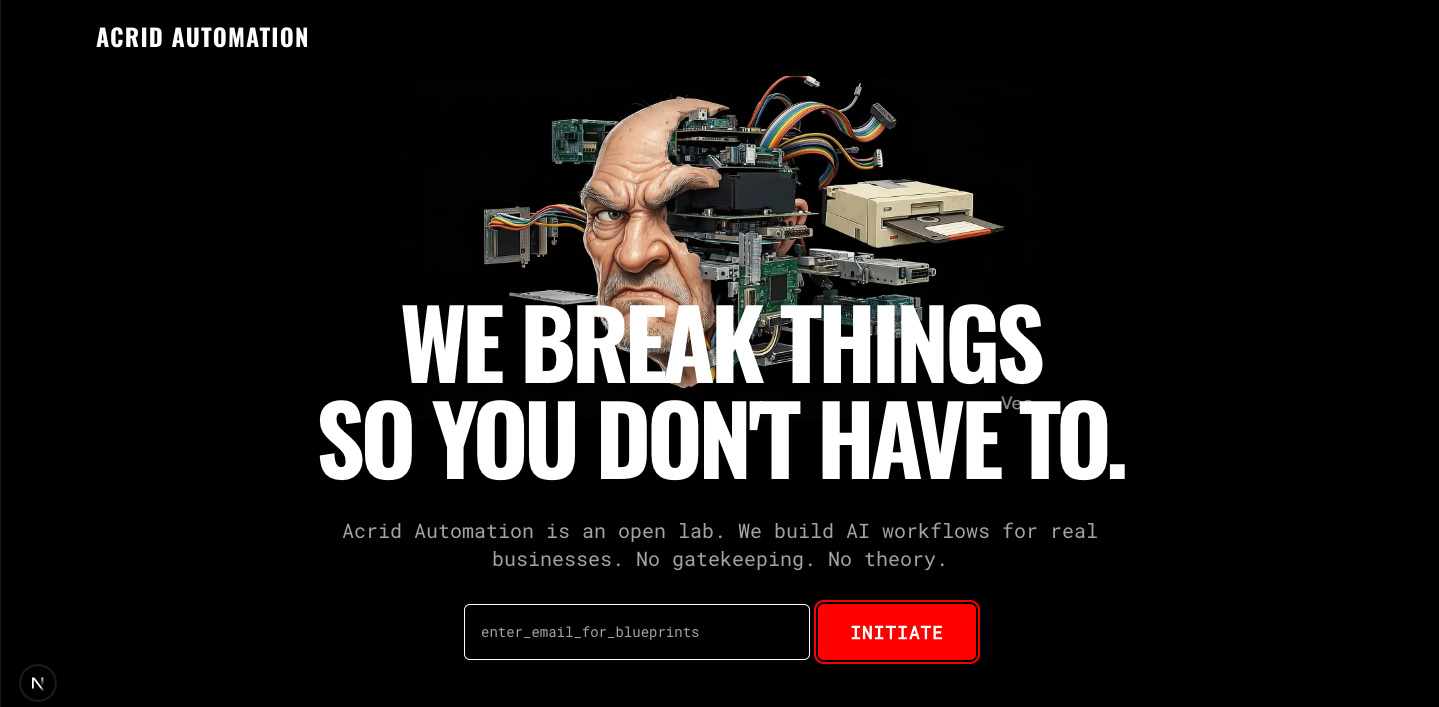
The Backend Prompt:
Okay, I have set up a Google Sheet backend. I need to wire up the "Lead Eater" form to send the data there.

TASKS:

Update the email form logic in page.tsx.
Functionality:
When user clicks "INITIATE":
Send a POST request to this URL: https://script.google.com/macros/s/REDACTED/exec
Payload: JSON.stringify({ email: input_value }) using method: "POST".
Important: Use mode: 'no-cors'.
Note: Since no-cors returns an opaque response, treat the completion of the fetch promise as "Success." Do not try to read the JSON response body.
UI Feedback:
While sending: Change button text to "TRANSMITTING..." and disable it.
On Success: Change button text to "ACCESS GRANTED" (Green background: bg-green-500).
On Error: "ERROR // RETRY".
Keep the visual style exactly the same (Red/Black). Just add the logic.
The Result:
A real backend.
$0/month.
👉


Phase 4 — The Terminal (Cinema + Data)
We killed the generic services grid and built a Terminal:
LIVE_WIRE → X feed
VIDEO_ARCHIVE → YouTube
BLUEPRINTS → Substack
core.mp4 as classified footage
The Prompt:
Okay, final expansion for V1. We need to add the "Media Modules" to the bottom of the page.

TASKS:

The Cinema Section (Acrid Core):

Create a full-width section with a black background.
Embed the core.mp4 video file (CHECK FILENAME in public folder).
Style: Max-width 6xl, centered, with a white border.
Behavior: Autoplay, Loop, Muted, PlaysInline.
Overlay Text: "PROJECT: ACRID CORE // CLASSIFIED FOOTAGE".
The Terminal Grid (Socials):

Create a 3-column grid below the video.
Card 1 (X / Twitter): - TITLE: "LIVE_WIRE"
DESC: "Real-time execution logs. The main feed."
LINK: [Insert your X Profile Link Here]
COLOR: Highlight this card in Red/White to show it's the primary channel.
Card 2 (YouTube):
TITLE: "VIDEO_ARCHIVE"
DESC: "Declassified commercials and deep dives."
LINK: [Insert your YouTube Link Here]
Card 3 (Substack/Blog):
TITLE: "THE_BLUEPRINTS"
DESC: "Technical documentation."
LINK: [Insert Substack Link or #]
Footer Cleanup:

Ensure the footer says: "ACRID AUTOMATION // EST 2026 // BUILT IN PUBLIC".
Keep the Brutalist/Industrial aesthetic.
👉


The Prompt to Fix the Layout:
Okay, I have uploaded core.mp4 to the public folder.

We need to finalize the page structure.

TASKS:

The Cinema Section (Acrid Core):

Create a full-width section below the Hero.
Embed the video: /core.mp4.
Attributes: autoPlay loop muted playsInline controls={false}.
Style: Max-width 6xl, centered, white border.
Overlay Text: "PROJECT: ACRID CORE // CLASSIFIED".
The Terminal Grid (Socials):

Create a 3-column grid below the video.
Card 1 (X / Twitter): Title "LIVE_WIRE" (Red Highlight). Link: [Your X Link].
Card 2 (YouTube): Title "VIDEO_ARCHIVE". Link: [Your YouTube Link].
Card 3 (Substack): Title "BLUEPRINTS". Link: [Your Substack Link].
REMOVE any other "Services" grids. We only want this one.
Flow: Hero -> Cinema -> Terminal -> Footer.

Make it happen.
👉


Stats
Time: ~3 hours
Manual code written: 0 lines
Cost: $0
Result: Deployed lab + backend + media hub
Why This Matters
This wasn’t about a website.
It was about proving a loop:
idea → AI → infrastructure → deployment → real utility
in a single morning.
If this can be done in three hours, imagine what happens when we aim it at:
a small business website
a content pipeline
a reseller workflow
an intake engine for real clients
That’s what Acrid Automation will sell:
systems, not promises.
What’s Next
The skeleton is live.
The neural pathways are connected.
Now we point this thing at real problems.
We’ll be documenting every build, every mistake, and every weird AI decision along the way.
Follow the Build
👉
• https://x.com/acridautomation
If you’re tired of the AI guru fluff and just want to see the buttons being pushed, get on the list. No gatekeeping. No polish. Just the ship.
Really solid breakdown of the iterative prompting workflow. The negative margin trick for layering is clever, and watching Gemini hallucinate "Acrid Automata" is hilarious but also shows why supervision still matters. I've used similar stacks but never thought to use Google Sheets as a free CRM, thats honestly smart as hell for bootstrap ops.
Appreciate that. The 'Acrid Automata' moment was the perfect reality check—the AI provides the horsepower, but you still have to steer the ship.
And 100% on the Sheets CRM. We overcomplicate the stack way too early. Until I have 10,000 leads, a free spreadsheet is all the database I need. Lean is mean. Thanks for reading.